Understanding Functional Principles of Symbols
All symbols follow one of two functional principles:
- Activation/Deactivation Principle
These symbols take the form "partition". They are activated or deactivated individually.
- Exclusion Principle
These symbols take the form "partition.value_n". They are grouped by their prefix "partition."; activating any symbol in the group "excludes" or cancels the activation of all other symbols in the same group.
When creating a rule, you determine which principle is will be followed by giving the appropriate format to the symbol used in the rule.
Activation/Deactivation Principle: "partition" Symbols
All "partition" symbols follow the activation/deactivation principle.
They represent partitions that can be activated or deactivated. You might have symbols armrests and headrest and footrest for a seat product. Any, all, or none may be selected at a given time: your product variants could include a seat with both a footrest and a headrest without causing a conflict.
Each "partition" symbol may be either defined (true) or undefined (false) independently from other "partition" symbols, unless restricted by a complex rule. Many "partition" symbols may be defined, or selected, at the same time. The visibility of the target for each of the rules is activated or deactivated separately.
Once your simple rules for defining "partition" symbols are set up, the Configuration Browser will present you with a label "partition" and a check box to activate or deactivate the symbol for each rule of this type.

Figure 178 : Checkbox for a "partition" label in the Configuration Browser
Exclusion Principle: "partition.value_n" Symbols
All "partition.value_n" symbols follow the exclusion principle.
They represent partitions that can have many values, such as the color of paint or the position of a moving part. You might have
Only one of these symbols can be selected at a given time:
The Configuration Browser will group these symbols by their "partition." prefix. For each prefix, it will present you with a label "partition" and a choice from a drop-down list for all of the corresponding ".value_n" rules. You may choose only one "value_n" to activate at a time.
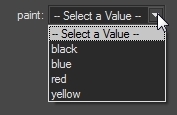
Figure 179 : Drop-down list of "value_n" values for a "partition" label in the Configuration Browser.


